Merge and PR follow-up
Check merge prerequisites and ask your connected agent to follow up on feedback.
On this page
Merge a reviewed pull request
Open a PR after connecting its repository. Check the head revision, risk reasons, required checks, review approvals and GitHub's merge state.
Use Merge only when you have permission and the PR meets the repository's requirements. The action can be unavailable because the PR is a draft, has conflicts, is still being checked or your account cannot merge it. Read the displayed reason rather than assuming a low grade unlocks merging.
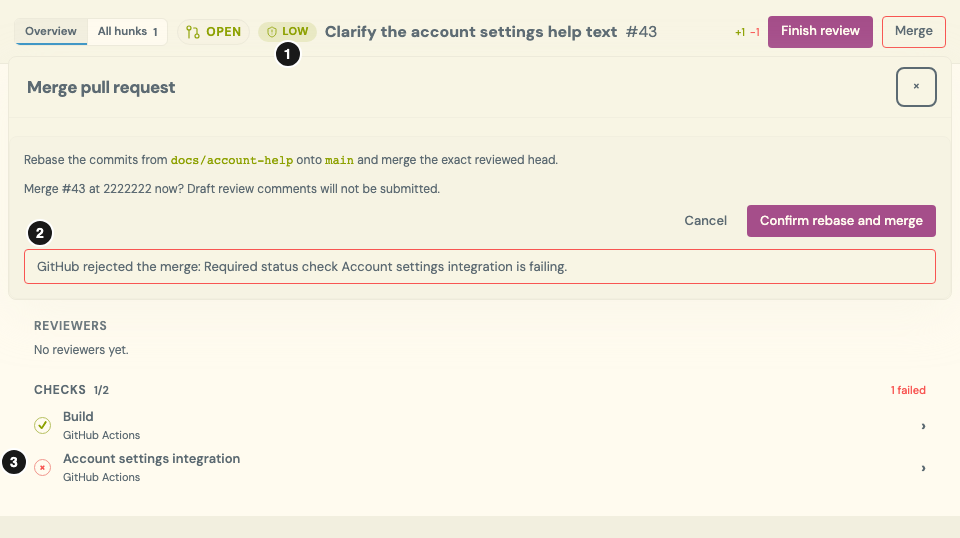
Illustrative PR and simulated server rejection; no merge was attempted against a real repository. Select the image for full size.
- Low risk is not approval. The grade describes this help-text change, not whether repository requirements are satisfied.
- Read the rejection reason. The current interface can still offer Merge when GitHub reports a blocker; the server enforces the requirements. Do not use the button’s presence as evidence that merging is allowed.
- Inspect the failed check. Open the check output, resolve the failure and verify CI on the current head before trying again.
Marking a hunk reviewed is not a GitHub approval or merge. A new push requires reviewing the new revision and its risk signals.
Follow up with your connected agent
Use the same MCP connection to recall relevant team lessons and saved risk evidence while you work through PR feedback.
Summarize this pull request's review feedback, failing checks and saved risk evidence for the current head. Explain the next change to make and ask before modifying code or pushing.
The agent must use its available, authorized tools for code changes and check execution. Connecting to ArchDev does not itself start unattended repair, grant repository write access or authorize a merge. If a requested operation is unavailable, the agent should explain that rather than claiming it ran.
Verify the revised change
After a fix, check the new head and the actual test results. A previous grade does not cover a new commit, and an agent's status update is not proof that CI passed.
Revisit the review walkthrough and resolve any remaining uncertainty before merging. With approval, record a useful finding in the Stream so the next review can use it.